
Tuner4TRONIC Command (T4T-CMD 4) - User Manual
Install and use T4T-CMD 4 to program and read LED drivers, select programming interfaces, print labels, and interpret return codes.
Updated · by Administrator
On this page
- Please note
- 1 Introduction
- 2 Installation
- 3 Features and command line options
- 3.1 Program an ECG
- 3.2 Display help (-h, -help)
- 3.3 Display command line and DLL versions (-version)
- 3.4 Increase verbosity (-verbose)
- 3.5 Specify the programming interface (-PI)
- 3.6 Enable NFC box programming (-BP)
- 3.7 Read back an ECG (-r)
- 3.8 Specify the readback output file (-o)
- 3.9 Enable label printing (-lp)
- 3.10 Specify the label-printing spooling folder (-spf)
- 3.11 Specify a label definition file (-ldf)
- 3.12 Disable cloud services (-nocloud)
- 3.13 Disable updating of programming results (-noupdateresults)
- 3.14 Set NFC antenna power (-antennapwr)
- 3.15 Read ECG information (-ecginfo)
- 3.16 Read the luminaire GTIN (-lumgtin)
- 3.17 Check for updates (-check)
- 3.18 List programming interfaces (-interfaces)
- 3.19 Disable the power-on status check (-nopowercheck)
- 3.20 Read a QR code from ECCO Smart HF 2D (-barcode)
- 3.21 Force family programming off (-fp:off)
- 3.22 Override the power-on delay (-pod)
- 4 Error codes
- Service contact
Tuner4TRONIC Command (T4T-CMD 4) - User Manual

This manual covers T4T-CMD 4.x and is based on the May 2024 user manual.
Please note
All information in this guide has been prepared with great care. Inventronics, however, does not accept liability for possible errors, changes and/or omissions. Please check the Inventronics Tuner4TRONIC page or contact your sales partner for an updated copy of this guide.
This technical application guide is for information purposes only and aims to support you in tackling the challenges and taking full advantage of all opportunities the technology has to offer. It is based on Inventronics' own measurements, tests, specific parameters and assumptions. Individual applications may not be covered and may need different handling. Responsibility and testing obligations remain with the luminaire manufacturer/OEM/application planner.
1 Introduction
The Tuner4TRONIC Command Line Application (T4T-CMD) programs luminaire Production Files (.osrtup) into Inventronics electronic control gear (ECGs). Production Files can be generated with the cloud-based Tuner4TRONIC Configurator or locally with the former Tuner4TRONIC Development (T4T-D).
T4T-CMD runs in the Windows command line or Windows PowerShell. The source manual lists Windows 7 and Windows 10 as supported operating systems. T4T-CMD is based on T4T-DLL (ProgrammingAPI.dll).
Supported programming interfaces:
- DALI Magic.
- FEIG NFC reader ISC.PRH101.
- FEIG NFC reader CPR30.
- FEIG NFC reader ISC.MR102.
- FEIG NFC reader ISC.LR1002.
- FEIG ECCO Smart HF.BLE.
- OT Programmer (COM Box).
Earlier T4T-CMD 3.x versions supported ECG programming only. Version 4.x adds NFC box programming, ECG readback to raw data files (.osrtur), optional label printing during programming, update checks and additional command line options.
2 Installation
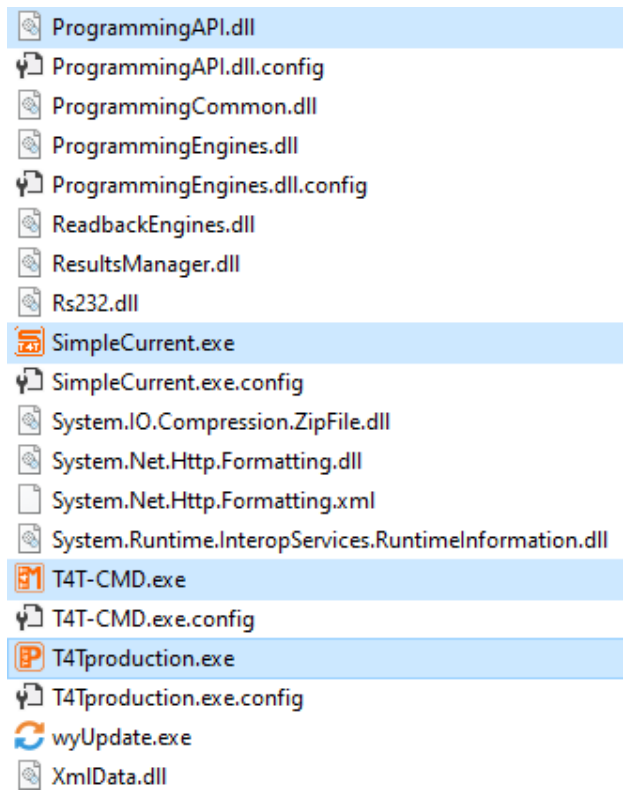
Since version 4.x, T4T-CMD is included in the Tuner4TRONIC Production installation. The executable T4T-CMD.exe and T4T-DLL (ProgrammingAPI.dll) are in the T4T-P 4.x installation directory:
C:\Program Files (x86)\Tuner4TRONIC 4
3 Features and command line options
General usage:
T4T-CMD.exe [options] [production_file]
optionsare optional command line options.production_fileis the path to the.osrtupfile used for ECG programming.- Unless otherwise specified, options can be entered in any order.
- If an option requires an argument, place the argument immediately after that option.
3.1 Program an ECG
Provide the path to a valid Inventronics Production File. Other options may be added.
The T4T command string required by version 3.x is optional in version 4.x and remains available for backward compatibility. Both commands below program prod.osrtup into the ECG:
T4T-CMD.exe prod.osrtup
T4T-CMD.exe T4T prod.osrtup
T4T-CMD waits for successful ECG detection until a timeout is reached: 5 seconds for DALI programming interfaces and OT Programmers, and 20 seconds for NFC programming interfaces.
Additional examples:
T4T-CMD.exe -verbose prod.osrtup
T4T-CMD.exe -PI DALI:DALIMAGIC1 prod.osrtup
T4T-CMD.exe -PI NFC:1FE27FEC prod.osrtup
T4T-CMD.exe -PI OSRSER:COM7 prod.osrtup
T4T-CMD.exe -BP 20 prod.osrtup
T4T-CMD.exe -PI NFC:1FE27FEC -BP 20 prod.osrtup
T4T-CMD.exe -lp -spf C:\Users\User1\Documents prod.osrtup
T4T-CMD.exe -lp -spf C:\Users\User1\Documents -ldf LabelDf.txt prod.osrtup
T4T-CMD.exe -noupdateresults prod.osrtup
T4T-CMD.exe -nocloud prod.osrtup
T4T-CMD.exe -antennapwr 5 prod.osrtup
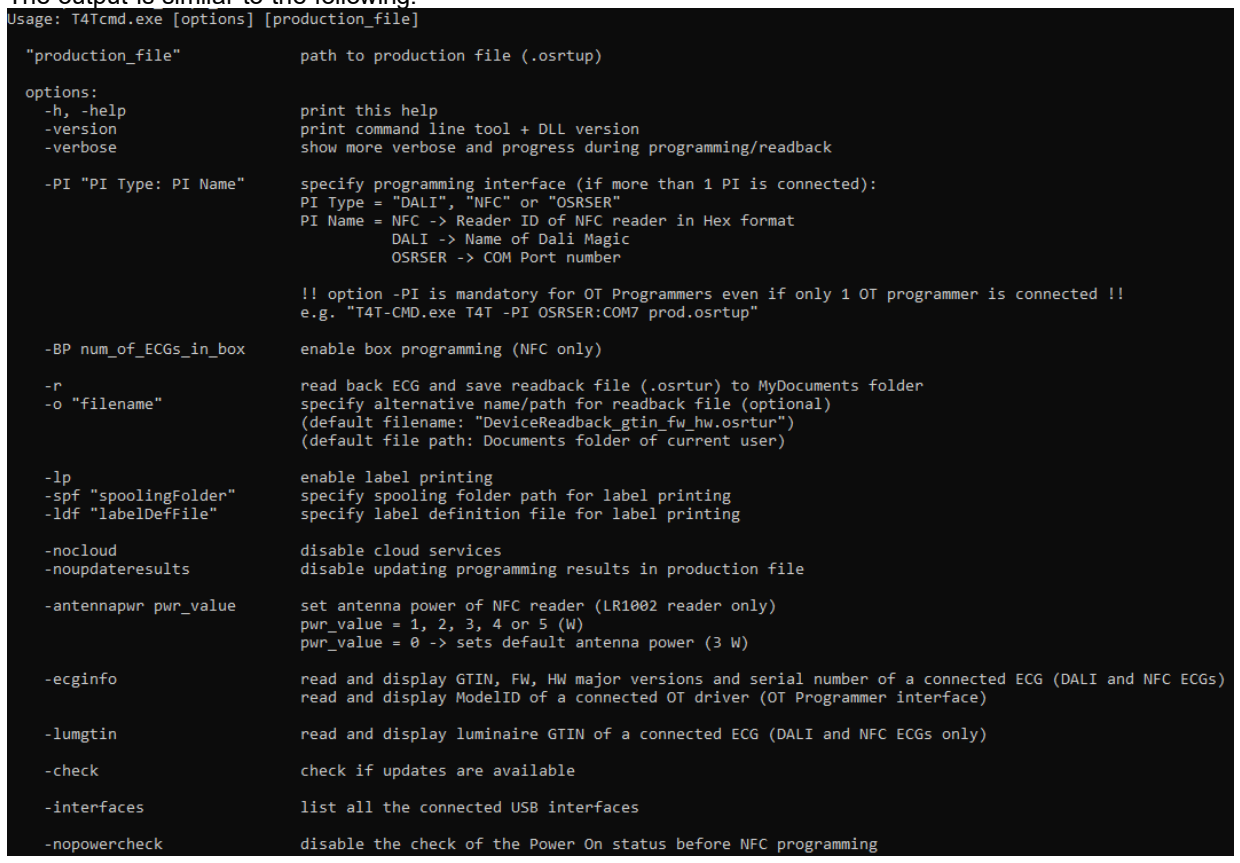
3.2 Display help (-h, -help)
Use either option to display the help text:
T4T-CMD.exe -h
T4T-CMD.exe -help
3.3 Display command line and DLL versions (-version)
Display the versions of T4T-CMD and T4T-DLL (ProgrammingAPI.dll):
T4T-CMD.exe -version

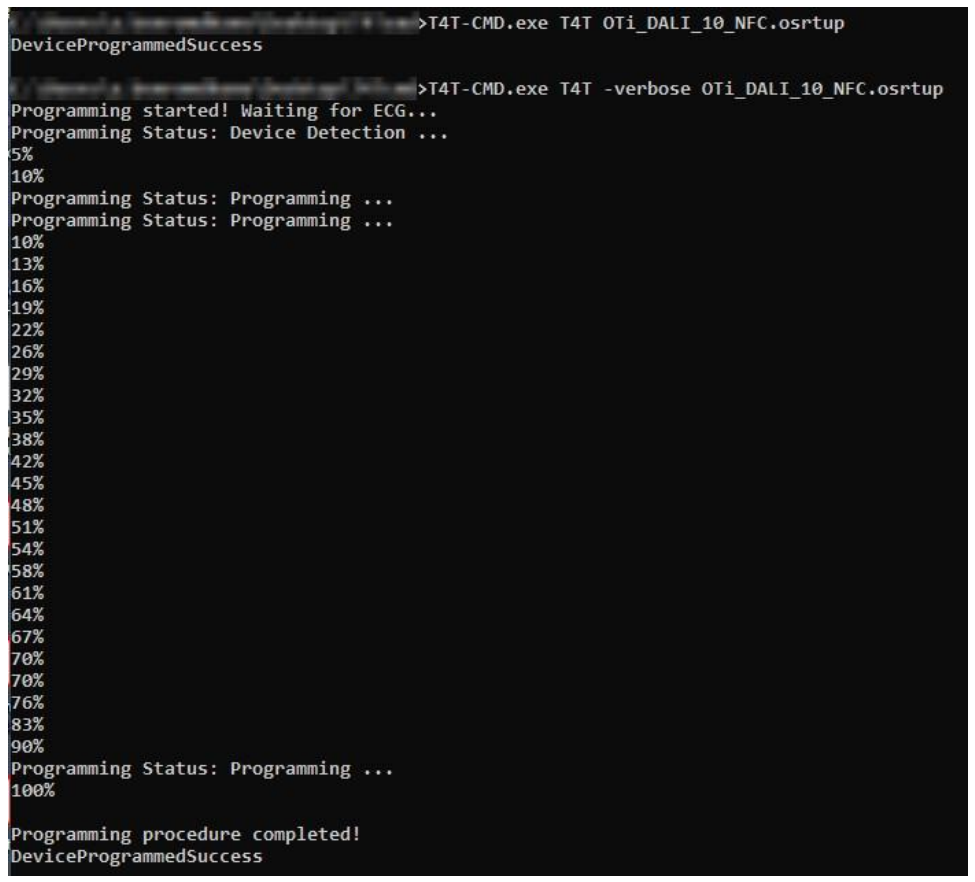
3.4 Increase verbosity (-verbose)
Use -verbose to display more details and progress during programming or readback. Without it, the tool displays only its return code at the end. Combine it with other options as needed.
T4T-CMD.exe -verbose "testfile.osrtup"
T4T-CMD.exe T4T -verbose "testfile.osrtup"
T4T-CMD.exe -r -verbose
T4T-CMD.exe -verbose -ecginfo
3.5 Specify the programming interface (-PI)
When multiple programming interfaces are connected, select one with -PI. Otherwise, an error code is returned.
-PI "PI Type:PI Name"
| Type | Interface name |
|---|---|
| NFC | NFC reader ID as a hexadecimal string, with or without the 0x prefix. Find it in Tuner4TRONIC Production 4.x under Settings > Programming, or with FEIG service tools. |
| DALI | DALI Magic name. View or change it in Tuner4TRONIC Production 4.x under Settings > Programming. |
| OSRSER | OT Programmer COM-port number from Windows Device Manager. Both the number alone and the COM prefix are accepted. |
Important: For OT Programmers,
-PIand the COM-port number are mandatory even when only one OT Programmer is connected. Without them, T4T-CMD will not find it when scanning for interfaces.
T4T-CMD.exe T4T -PI OSRSER:COM7 prod.osrtup
T4T-CMD.exe -PI DALI:DALIMAGIC1 prod.osrtup
T4T-CMD.exe -PI NFC:1FE27FEC prod.osrtup
T4T-CMD.exe -PI NFC:0x1FE27FEC prod.osrtup -verbose
T4T-CMD.exe -PI OSRSER:COM7 prod.osrtup
T4T-CMD.exe -verbose prod.osrtup -PI OSRSER:3
3.6 Enable NFC box programming (-BP)
Use -BP N, where N is the expected number of ECGs in the box. Only FEIG ISC.MR102 and ISC.LR1002 readers support box programming, according to the source manual.
T4T-CMD.exe -BP 20 prod.osrtup
T4T-CMD.exe -PI NFC:1FE27FEC -BP 20 prod.osrtup
T4T-CMD.exe -PI NFC:1FE27FEC -BP 10 prod.osrtup -verbose
3.7 Read back an ECG (-r)
Use -r to read a connected ECG and save its data to a raw data file (.osrtur). All three interface types support readback: DALI, NFC and OSRSER.
Optionally specify the output name and path with -o. Otherwise, the defaults are:
- Filename:
DeviceReadback_gtin_fw_hw.osrtur, wheregtinis the connected ECG's GTIN,fwits firmware revision andhwits hardware revision. - Folder: the current user's Documents folder.
For OT drivers connected through an OT Programmer, firmware and hardware revisions cannot be read, so those filename fields are empty. A Model ID is read instead of a GTIN.
If multiple programming interfaces are connected, select one with -PI.
T4T-CMD.exe -r
T4T-CMD.exe -r -verbose
T4T-CMD.exe -PI NFC:1FE27FEC -verbose -r
3.8 Specify the readback output file (-o)
Use -o only with -r. Place the filename immediately after -o. If it contains no path, the raw data file is saved in the current working directory.
T4T-CMD.exe -r -o data.osrtur
T4T-CMD.exe -r -o C:\Users\User1\Desktop\data.osrtur
T4T-CMD.exe -PI NFC:1FE27FEC -verbose -r -o data.osrtur
3.9 Enable label printing (-lp)
Label printing is disabled by default. Use -lp to enable it for the current execution. After successful ECG programming, the tool generates Output.csv containing all parameter data programmed into the ECGs and saves it in the spooling folder.
-spf is mandatory with -lp to specify that folder. Without it, the source manual describes a NoValidParameterPassed error. Include -lp on every invocation that requires label printing.
T4T-CMD.exe -lp -spf C:\Users\User1\Documents prod.osrtup
T4T-CMD.exe -lp -spf C:\Users\User1\Documents -ldf LabelDf.txt prod.osrtup
3.10 Specify the label-printing spooling folder (-spf)
Use -spf with -lp. Place the spooling folder path immediately after -spf. The folder must already exist, and the user must have read and write permissions; otherwise, an error is returned.
T4T-CMD.exe -lp -spf C:\Users\User1\Documents prod.osrtup
3.11 Specify a label definition file (-ldf)
Use the optional -ldf option to specify a label definition file. Place its name immediately after the option.
T4T-CMD.exe -lp -spf C:\Users\User1\Documents -ldf LabelDf.txt prod.osrtup
3.12 Disable cloud services (-nocloud)
Cloud services are enabled by default. With -nocloud, neither programming data nor programming results from the current session are uploaded to the cloud. This can avoid network connections that could slow production.
T4T-CMD.exe -nocloud prod.osrtup
3.13 Disable updating of programming results (-noupdateresults)
By default, luminaire programming results are updated in the Production File at the end of programming. Use -noupdateresults to disable this, for example when the file is on a network share with a slow connection.
T4T-CMD.exe -noupdateresults prod.osrtup
T4T-CMD.exe -PI DALI:DALIMAGIC1 -verbose prod.osrtup -noupdateresults
3.14 Set NFC antenna power (-antennapwr)
This option applies only to the FEIG ISC.LR1002 reader and is ignored for other NFC readers. Place the power value in watts immediately after -antennapwr.
- Valid power settings: 1, 2, 3, 4 or 5 W.
- A value of 0 selects the default antenna power of 3 W.
T4T-CMD.exe -antennapwr 5 prod.osrtup
T4T-CMD.exe -PI NFC:0x1FE27FEC -antennapwr 4 -verbose prod.osrtup
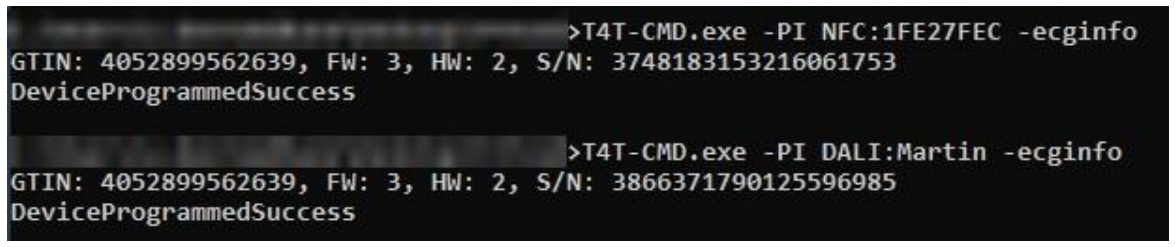
3.15 Read ECG information (-ecginfo)
Read and display the connected, unidentified ECG's driver GTIN, firmware major revision, hardware major revision and serial number. This option supports DALI and NFC ECGs; OT drivers are not supported. Select an interface with -PI if multiple interfaces are connected.
T4T-CMD.exe -ecginfo
T4T-CMD.exe -PI NFC:0x1FE27FEC -ecginfo
T4T-CMD.exe -PI DALI:DALIMAGIC1 -ecginfo
3.16 Read the luminaire GTIN (-lumgtin)
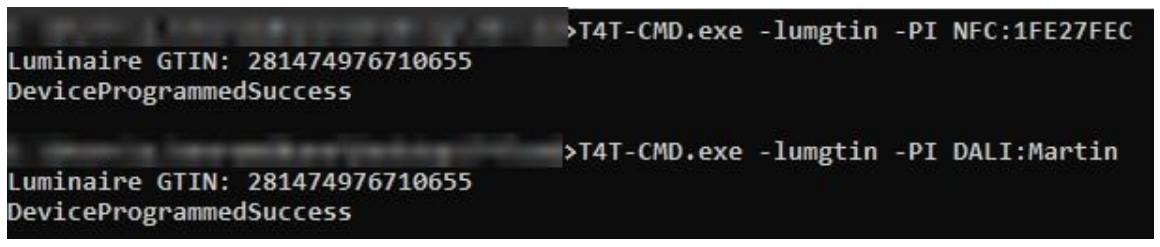
Read and display the luminaire GTIN from a connected ECG. This option supports DALI and NFC ECGs; OT drivers are not supported. Select an interface with -PI if multiple interfaces are connected.
T4T-CMD.exe -lumgtin
T4T-CMD.exe -PI NFC:0x1FE27FEC -lumgtin
T4T-CMD.exe -PI DALI:DALIMAGIC1 -lumgtin
3.17 Check for updates (-check)
T4T-CMD.exe -check
| Return name | Meaning |
|---|---|
| NoUpdatesAvailable | The installed version is already the latest. |
| UpdateAvailable | A newer version is available on the update server. |
| UpdateCheckError | The update server could not be reached, a timeout occurred, or another error occurred. |
3.18 List programming interfaces (-interfaces)
List all connected DALI and NFC programming interfaces. OT Programmers are not supported by this option and will not be listed.
T4T-CMD.exe -interfaces

3.19 Disable the power-on status check (-nopowercheck)
-nopowercheck disables the power-on status check during NFC programming.
Normally, T4T-P4 rejects NFC programming when the driver is connected to mains, because NFC data may be corrupted. In the worst case, programming may be acknowledged even though the data was not programmed correctly. Drivers set a power-on flag in the NFC tag to tell the programming software they are powered.
The May 2024 manual describes some production lots where this flag was set incorrectly even though the driver was not connected to mains. Programming with -nopowercheck can repair these drivers.
Warning: Before using
-nopowercheck, ensure that the driver is not powered. The software will not perform this check. Do not use this option by default.
T4T-CMD.exe prod.osrtup -nopowercheck
3.20 Read a QR code from ECCO Smart HF 2D (-barcode)
Use -barcode to scan and return a QR code from a connected FEIG ECCO Smart HF 2D. Connect the device to T4T-P4 through Bluetooth. Refer to the T4T-P4 manual for interface identification and connection details.
Find the COM port under Tools > Settings > Programming > ECCO Smart 2D / COM, then pass it to the command using -PI NFCCOM:<port>.
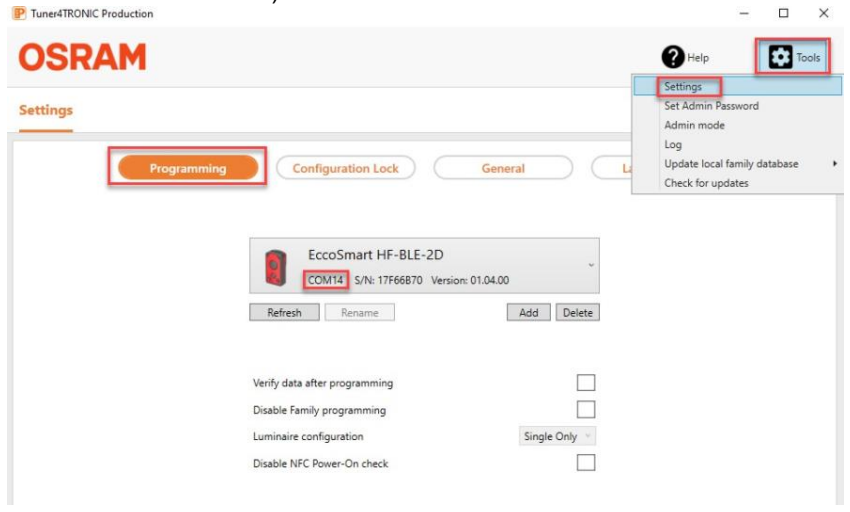
For COM port 14:
T4T-CMD.exe -PI NFCCOM:14 -barcode
Example output:
Barcode: E20170007590AM3117700OL000495
OperationCompletedSuccess
The source PDF spells the executable T4TCMD.exe in this section and one verbosity example. The installation section and other examples use T4T-CMD.exe; the commands here consistently use that installed executable name.
3.21 Force family programming off (-fp:off)
Use -fp:off to disable family programming. Drivers whose EAN and firmware major revision do not match the Production File are rejected.
T4T-CMD.exe -PI DALI:DALIMAGIC1 -fp:off prod.osrtup
3.22 Override the power-on delay (-pod)
Use -pod <time in seconds> to override the power-on delay before programming. The delay from the Production File is ignored.
T4T-CMD.exe -PI DALI:DALIMAGIC1 -pod 5 prod.osrtup
4 Error codes
For backward compatibility, the error code numbers from T4T-CMD 3.x remain valid. Version 4.x adds further codes. Names below follow the source manual's error-code table.
| Code | Error name printed on the console | Description and possible causes |
|---|---|---|
| 0 | DeviceProgrammedSuccess | ECG programming, readback or another operation completed successfully. |
| -1 | GeneralApplicationError | General application error, such as incorrect syntax or an invalid command line option. |
| 4 | ProgrammingValidationFailed | Validation after programming failed. |
| 101 | No_Invalid_ParameterPassed | No Production File was passed. |
| 200 | ParamFileNotExists_Readable | The Production File does not exist or cannot be read. |
| 201 | ParamFileInvalid | The Production File is invalid. |
| 202 | ParamFileIsEmpty | The Production File is empty. |
| 500 | NoDeviceConnected | No ECG is connected; a DALI ECG is not powered; an OT Programmer's PROG+ and PROG- connections are swapped; or the ECG is outside NFC reader range. |
| 501 | TooManyDeviceConnected | Too many ECGs are connected. |
| 502 | WrongDeviceConnected | Wrong ECG type, or correct type with a Production File for another firmware or hardware version. In multi-programming, one or more ECGs may be missing. Check the devices' IC codes. |
| 503 | WrongDeviceVersionConnected | Not used by T4T-CMD. |
| 700 | HWProgrammerNotFound_CommunicationError | No interface found, no interface supported by the ECG found, too many interfaces connected, a communication error, or the interface is in use by other software. |
| 701 | HWProgrammerFWVersionUnsupported | Unsupported programming-interface firmware, such as DALI Magic firmware below 2.5. |
| 702 | DALI_OP_HWProgrammerOverloaded | The interface's DALI output is overloaded or short-circuited. |
| 2005 | DeviceProtected | The ECG is write-locked by an OEM code that is missing from the Production File or does not match. |
| 3000 | NFCDifferentEcgsInTheBox | Different ECGs are present in the box during NFC box programming. |
| 3001 | UnlockPasswordNotMatchingEcgs | ECGs in the box have different unlock passwords during NFC box programming. |
| 4000 | NoUpdatesAvailable | The local version is already the latest. |
| 4001 | UpdateAvailable | A newer version is available on the update server. |
| 4002 | UpdateCheckError | The update server could not be reached, or another error occurred. |
Service contact
Inventronics GmbH
Parkring 31-33
85748 Garching, Germany
Phone: +49 89 6213-0
www.inventronicsglobal.com
Tuner4TRONIC support: T4Tsupport@inventronicsglobal.com